How to Use MOCs
Guide for effectively using Maps of Content for knowledge navigation
· 2 min read · budding
Maps of Content (MOCs) are navigation hubs that connect related knowledge areas. They help you build an interconnected personal knowledge graph.
Core Concepts
- Structure - Organize information into logical topic clusters
- Connections - Create clear pathways between related ideas
- Overview - Provide high-level views of knowledge domains
- Access - Enable quick retrieval of key information
Implementation
- Start with foundational areas like Learning and Career Map
- Use descriptive link text that adds context
- Maintain consistent MOC formatting
- Update regularly as knowledge grows
Best Practices
- Keep each MOC focused and well-scoped
- Add brief descriptions for linked content
- Use tags for cross-referencing
- Follow MOC Best Practices
Organization
- Group related content thematically
- Use clear heading hierarchies
- Include metadata via tags and icons
- Apply Knowledge Organization principles
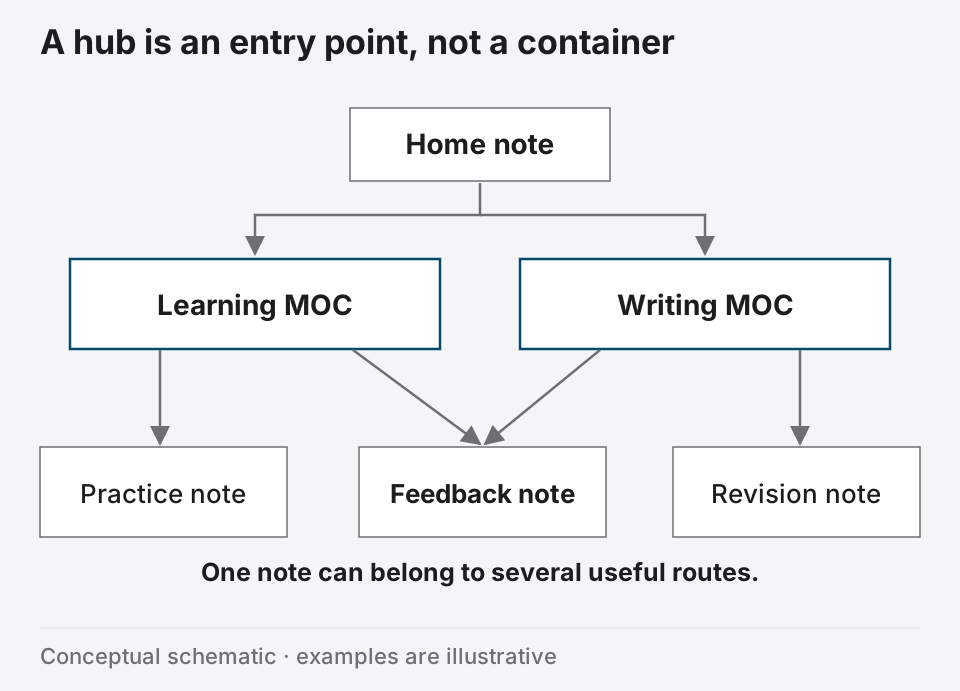
Navigation Flow
- Begin at main hub
- Browse topic MOCs
- Follow contextual links
- Use tag navigation
Tip
Review Regularly Schedule MOC reviews to maintain effective navigation as your knowledge base expands.
Linked from
- Knowledge Organization
Reference MOC usage guidelines for navigation strategies
- MOC Best Practices